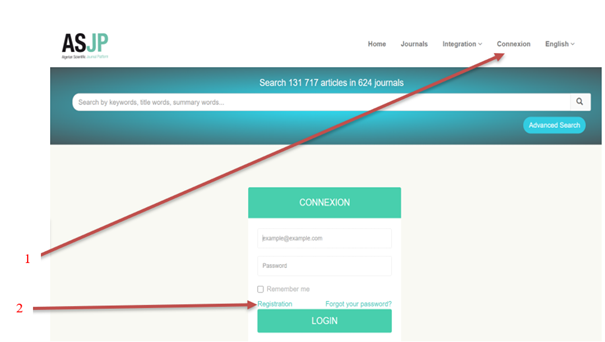
To publish research in the "Journal of Contemporary Business and Economic Studies," authors must create an account on the Algerian Scientific Journals Platform (ASJP). This is a mandatory step for article submission and can be completed by visiting the portal website at https://www.asjp.cerist.dz. Select your preferred language (Arabic, English, or French), then click on “Connexion” at the top. From there, proceed to the "Registration" button, which will open a page where you can fill in the required personal information.
After completing the registration, a confirmation email will be sent to the email address provided during registration.
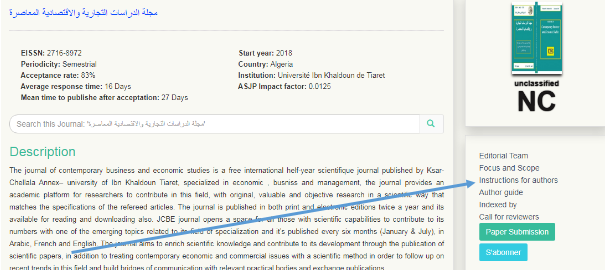
After registration, download the journal template from the "Instructions to the Author" icon in the section for the Journal of Contemporary Business and Economic Studies on the Algerian Scientific Journals Platform (ASJP) via the following link:https://www.asjp.cerist.dz/en/PresentationRevue/617
Note: Researchers wishing to publish must have WinRAR software to unzip compressed files.
Important: Researchers must adhere to the journal template to avoid the formal rejection of their article.
After downloading the template and writing your article, log in to the platform using your email and password. Go to the journal page at https://www.asjp.cerist.dz/en/submission/6177 and click on the "Submit Article" icon on the left side of the screen. This will display a set of fields to be filled out, including various details about the article and the authors, such as:
If there is more than one author, click on "Add Author" and enter their details using the same steps mentioned above.
Note: The "Reviewers' suggestion" field is optional.
Important: The article must be in Word format.
After filling in all the data and uploading the paper file to the platform, click on "Paper Submission" under the information form. A confirmation message will appear if everything is correct. If there is an error or missing information, the confirmation message will not appear.
If the paper submission process was successful, a message will appear on the screen indicating that. The author will receive notification of the article's submission in his email. Also a notification to the second author, if exist, confirming their participation in the paper.
The author can log in to their account on the platform to check the status of their article. To do this, click on the "Papers" icon and then on the "Sent Papers" icon. A table will appear with the following details:
The status of the article will go through several stages:
1-The editor-in-chief downloads the paper and reviews it for adherence to the template, formal requirements, and the paper's relevance to the journal's specialization.
2- The editor-in-chief then decides to accept or reject the paper:
3- Paper evaluation / reviewing step
Encrypt the article:
Once the paper form has been accepted by the editor-in-chief, the article will be encrypted, by hiding all author’s information, and converted to to PDF format for the review (the editor can do call for an co-editor, who in turn will present it to two reviewers from his network). The evaluation must be done according to an evaluation form available on the ASJP platform.
Examination of the reviewers decisions:
After reviewing the paper, it will return to the editor-in-chief to check on the reviewers' decisions, as follows:
1- Two positive reports that allow publication: The editor works on the publication and the author is notified by a message indicating that the paper is accepted for publication.
2- A positive decision and a negative decision: the paper will be return to a third reviewer to evaluate and decide.
3- Two negative reports: The paper will be rejected by the editor-in-chief and the author will be notified by a message indicating that the paper is rejected.
Results of the review:
1- Article accepted :Accept the article for publication and inform the author.
2- An acceptable article with a bit of adjustment: The author must take in to account the comments of the reviewers and resent the corrected paper via the e-mail of the journal.
3- An article accepted with reservation: Here, the author must take in to account the comments of the referees and resent the corrected paper attached to the answers file via the platform in the box of papers accepted with reservation.
4- Rejected article: reject the paper and inform the author.
1- Sending the commitment letter
After final acceptance of the paper, the author (s) send a letter of commitment for the journal, (the letter is included in a zip file in the "Author's Guide"), after signature, to the journal's email: revuejcbes@univ-tiaret.dz
2- Insertion of references
After accepting the article, the author receives notification, after which he must log into his account on the platform and insert the references listed in the paper according to the framework specified by the Algerian platform of scientific journals ASJP, by following these steps:
Note: When you click Save Only, the references do not appear in the Editor-in-Chief and the process is not complete, so you must click Finish.
After being accepted by the editor-in-chief, the paper can be scheduled for publication, and if the references are incorrect and are not identical to the paper's, the editor-in-chief will reject them and the process will be repeated again.
Note: the references are inserted from the account of the first submitter author (Case of several authors.)